
The Email Was Real. The Sender Was Real. The Message Wasn’t.
Compromised email scams aren’t new. Most of us have seen the old version: a strange two-line message from someone we know asking for a favor, requesting gift cards, or telling us to click an unexplained link. The email address may have been real, but the message itself often gave the scam away.
These didn’t.
Neither of these emails came from a stranger. Both accounts were real, and both had been compromised — hijacked and used to send scams to people who knew the real account owners. That’s what makes them so hard to catch.
A compromised business email can be used to redirect payments, steal information or, as in these cases, convince someone to install software.
A Routine DocuSign Request — From a Real Business Account
There wasn’t an obvious “phishing email” to spot. The message came from the actual business email account of someone they knew and appeared on their phone as an ordinary notification. Like most of us, they move quickly through notifications on their phone. They opened this one almost reflexively. It was a request from someone they knew to review a document through DocuSign. The sender’s email address was correct, the message looked legitimate, and there were no tell-tale spelling errors or suspicious-looking links. So they clicked.
A pop up appeared which said this document cannot be viewed on a mobile device, please download our app. That’s when the internal alarm bells finally sounded and they closed out of the email immediately without clicking further or downloading anything. When they contacted the sender, they learned that the business account had been compromised. The sender said they had heard from dozens of people who had received the message and that some had downloaded the software.
DocuSign warns users about phishing attempts involving fraudulent documents and links and advises users not to download software to access a document. Attackers are using compromised, registered DocuSign accounts to send documents that prompt you to click through or download a tool to view the file. The download can install software that gives an attacker remote access to the device. DocuSign’s own guidance is direct: they will never ask you to download software to view a document, and if you’re ever prompted to, that’s the moment to stop.
The Next Day, It Happened Again
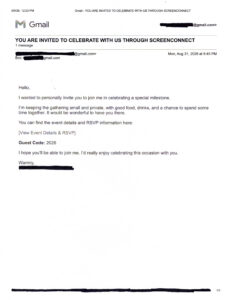
Then, the very next day, it happened again. They received an email from an old family friend with a warm subject line about celebrating a milestone together: small gathering, good food, hope you can make it. Real person. Real email address. But after the DocuSign incident the day before, their guard was up. And this time something didn’t add up: why would an old family friend need ScreenConnect — legitimate remote-access software — to send a party invitation?
The invitation wasn’t really the destination. It was the delivery mechanism. Security researchers at Malwarebytes recently documented this exact campaign: the download is presented as part of the RSVP process but installs ScreenConnect — a legitimate remote access tool, the same kind IT companies like ours use every day to fix computers remotely. Once it’s running, whoever’s behind it can see the screen, move the mouse, open files, and keep that access even after a restart, with almost no visible sign anything happened. The FTC issued a public warning on the broader pattern this spring: invitations that appear to come from someone you know, asking you to log in or download something before you can see the details.
When the Sender Is Real, What Are You Supposed to Spot?
Neither of these emails came from a stranger. Both accounts were real, and both had been compromised — hijacked and used to send the scam to people who knew the real account owners. That’s what makes them so hard to catch. They’re also harder for spam filters to catch because the messages can originate from legitimate, compromised accounts rather than spoofed addresses. They’re genuinely coming from a friend’s email, a vendor’s email, a board member’s email. The account is real. The person controlling it, in that moment, isn’t.
The first attack got as far as it did precisely because the recipient knew the sender. The skepticism we bring to an unexpected email from a stranger doesn’t always kick in when a message comes from someone we trust. That’s exactly what compromised-account scams exploit. And it means training your team to “spot the fake email” only gets you partway there. Eventually, someone is going to get a message that looks exactly like this, from exactly the right person, on exactly the wrong day.
What Happens When Security Software Can’t Simply Block the Program?
That’s the uncomfortable part for small business owners. ScreenConnect isn’t malware. It’s legitimate software built for real IT support — and tools like it are used every day by IT companies, including ours. Security software can’t simply treat every remote-access application as malicious. That’s part of what makes this type of attack effective.
SentinelOne, which is included in every Siefer Services managed plan, doesn’t rely only on identifying known malicious files. It also monitors what software is actually doing. If activity begins to exhibit malicious behavior, SentinelOne can detect it and, depending on the threat and security policy, take action automatically — stopping or quarantining the threat and, when necessary, isolating the affected computer.
But legitimate remote-access software isn’t automatically malicious. If someone willingly installs it, there may be nothing inherently dangerous to block. The protection becomes particularly important when an attacker starts using that access to do something malicious.
That’s also where having managed IT protection matters. Security events from our RMM and endpoint protection are reported back to us for review. If a threat can be handled automatically, it is. If it requires intervention, our team can investigate and respond. Nothing catches everything, but the goal is to have another layer of protection when human judgment isn’t enough.
Cybersecurity Can’t Depend on Nobody Clicking
The reality is that businesses can’t verify every email with a phone call. Employees receive hundreds of messages, links, documents and requests every day, and most of them are legitimate. At some point, someone will click something they shouldn’t.
That’s why cybersecurity can’t depend entirely on the person sitting in front of the screen recognizing the threat. Employees still need to be cautious — particularly when they’re unexpectedly asked to download software or enter credentials — but there should be another layer of protection when they get it wrong.
In this case, nothing was downloaded. But twice in two days, sophisticated scams sent from real, compromised accounts got much further than the obvious phishing emails we’re accustomed to deleting. That’s the lesson: compromised email scams are getting harder for people to recognize, which makes what happens after the click increasingly important.
If you’re a small business and not sure what is your current cybersecurity set up, contact us for more information. We serve South Bend, Bremen, Elkhart, Granger, Mishawaka, Plymouth & the entire Michiana region.